| Charity No: 1197240
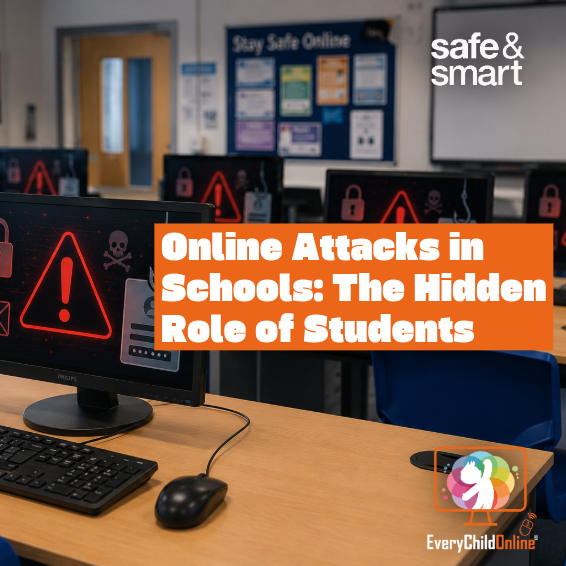
57 percent of insider data breaches in UK schools are caused by students. Polly Tarbard explores how pupils have become both the target and the entry point for school cybersecurity incidents, and what schools and parents can do about it.
By Polly Tarbard, Every Child Online Safe & Smart Online Blogger.
In schools the biggest cybersecurity vulnerability isn't always the IT system, it can be the students themselves. The Information Commissioner's Office (ICO) has found that over half (57%) of insider data breaches in UK schools are caused by students.
Increasingly, young people are both the targets and the perpetrators of cyber incidents. On one hand, attackers are no longer just targeting school servers or staff logins; they're going after pupils. They are increasingly targeting children as the easiest way into a school's digital infrastructure, aiming for weak passwords, compromised devices, or use phishing scams as a way to break into the school's systems. In essence, they are exploiting students as digital entry points. On the other, some pupils are actively breaching systems themselves by guessing teacher passwords or accessing restricted files for entertainment. Once inside, hackers can access everything from safeguarding files to financial data. Whether accidental or deliberate, these actions can have serious consequences; network shutdowns, data loss and even police involvement.
Nonetheless, in many cases the first step in the attack is simple: gaining access through a student.
One of the most common risks in these cases is poor password security. Most students use simple and easy to guess passwords, maybe based on current interests, nicknames, or 'the same password they use for everything'. Pupils may also openly share login details with friends. The ICO reports that 30% of school insider incidents were caused by stolen login details. Sometimes these details were written down, reused across accounts, or never changed. Of these attacks, students were responsible for 97% of them. In one reported case, students accessed sensitive school data by simply trying a teacher's name followed by "123". Weak password protection can lead to unauthorised access to confidential documents, exam materials, and even safeguarding reports. Many school platforms aren't well segmented, which means a single breached account can provide access to shared folders, staff information, or internal communication channels. A single weak password can compromise hundreds of students' privacy and bring entire systems offline. For schools already stretched thin on IT resources, recovering from a particularly brutal incident can take weeks and carry serious reputational and legal consequences.
Another method of gaining access to school systems is through phishing emails sent to pupils. This is one of the fastest growing threats in school cybersecurity. These scams often appear as harmless emails: a message from a teacher, an exam board update, or a link to revision materials, but they're designed to trick students into clicking malicious links or entering their login credentials. Once a student falls for it, the attacker gains full access to that email account. And because most schools operate on a shared email domain (such as @schoolname.org.uk) this access becomes a gateway. The hacker can now send emails from a trusted student address to classmates, staff, or even IT administrators, spreading malware or obtaining more passwords. The attacks are so efficient as most recipients assume the messages are safe because they come from inside the school system, so are much more likely to click any link within the email. With just one successful attack, cybercriminals can spread malicious files and compromise entire networks. What begins as a single click can quickly spiral into a full-blown school-wide breach. There have also been cases where students forward phishing emails intentionally, either as a joke or to test how far the scam can spread.
A third threat comes from malware downloaded from student devices, whether its downloaded directly onto school computers or brought in from home. In some cases, pupils try to install games, mods, or unauthorised apps on school machines during breaks, not realising the files contain malware. In more serious incidents, students have knowingly downloaded or spread malicious files, either to bypass restrictions or to disrupt school systems (sometimes with tools found easily online). These downloads often come from untrusted or pirated sources and can contain trojans, spyware, or keyloggers that compromise the entire school system. Many schools now use take-home laptops or allow bring-your-own-device (BYOD) access, which can expose the school's network to threats outside of school. A student might unknowingly connect an infected tablet to the school Wi-Fi, allowing malware to spread across shared drives, admin systems, or classroom apps.
While students are often the entry point through downloaded malware, another major concern is the security of remote access tools used by school staff. Remote Desktop Protocol (RDP), which allows teachers or administrators to access their work computers from home, remains one of the most commonly exploited attack vectors in ransomware incidents, warns the National Cyber Security Centre (NCSC). If a teacher has left their home computer vulnerable to online hackers, without strong password or multi-factor authentication, attackers can break in and consequently gain access to school systems. Although this threat primarily affects staff rather than students, it becomes part of the same broader problem: schools operating in highly connected digital environments without sufficient protections in place.
Weak passwords are one of the easiest ways hackers gain access to school systems, but they're also one of the easiest things to fix. It's essential that schools adopt robust password policies that block common passwords, require minimum lengths, and ensure that default logins are be replaced immediately. Passwords shouldn't be shared with friends or scribbled on post-it notes. Schools can also add extra protection by enabling account lockouts after multiple failed logins and turning on multi-factor authentication (MFA), especially for teacher and admin accounts. Most importantly, schools should run regular training sessions to help young people understand the risks of poor password habits. Parents, too, can support these efforts at home by encouraging safe practices and reminding children that even "just for fun" logins into someone else's account can lead to serious consequences. However, policies alone aren't enough; students need to understand why password security matters. Helping them see the real-world impact, like identity theft or someone changing their online homework submissions, makes the risk more relatable. Encourage students to avoid predictable information (like pet names or "abc123") and instead use phrases or sentences that are easy to remember but hard to guess, like "MyD0gIsAw3some!". Training sessions for staff and students should include real examples of breaches and how weak passwords contribute.
Phishing emails remain one of the most effective ways hackers can spread malware throughout a school system, which is why educating students on how to spot phishing attempts is critical. Similarly, with improving weak passwords, schools should run regular awareness sessions with real examples of phishing emails. This way students can learn the warning signs: poor grammar, mismatched links, urgent demands for login info, or unexpected attachments. The National Cyber Security Centre (NCSC) recommends using simulated phishing tests as part of school training to help both staff and students build muscle memory in spotting fake emails. Teachers and IT staff should ensure spam filters are enabled and email systems configured to block known phishing domains. Where possible, email banners warning of external messages can also help. At home, parents should talk to children about being cautious with links; even if a message appears to come from a classmate or teacher. Remind them: if in doubt, don't click, check with an adult or report it to a teacher. These conversations don't need to be technical; they just need to reinforce curiosity and caution. Helping pupils pause before clicking is one of the simplest and most powerful defences against a school-wide cyber breach.
To reduce the risk of malware entering the school network, schools need clear policies on what can be downloaded or installed on school devices. IT systems should block access to known risky websites, and student accounts should be restricted from installing unauthorised apps or software. Take-home laptops and BYOD schemes must include endpoint protection, which includes antivirus software, content filtering, and regular security updates, even when devices are used off-site. Importantly, any device that connects to the school Wi-Fi should meet basic security standards. Some schools now use Mobile Device Management (MDM) tools to monitor and control devices remotely, helping spot risks early and keep systems up to date.
For staff, secure remote access is equally crucial. The NCSC urges schools to enforce multi-factor authentication and strong passwords for any platform accessed offsite, especially RDP, which is a common target in ransomware attacks. Teachers should avoid logging into school systems from unsecured personal devices or public networks, and IT teams should regularly audit access permissions. In short, every device that connects to a school network (whether it belongs to a student or a staff member) must be treated as a potential point of entry. Schools that invest in basic cyber security tools and clear usage policies are far better placed to avoid costly and disruptive malware infections.
While external attackers remain a serious concern, schools must also recognise the threat posed by students who deliberately try to breach systems. These actions are rarely sophisticated but can be incredibly disruptive. The solution lies in prevention through education and early intervention. Schools should provide clear, age-appropriate lessons on digital ethics and the legal consequences of unauthorised access, making it clear that "testing your skills" on school systems can lead to real-world criminal charges. Engaging curious students in positive outlets like coding clubs, cybersecurity challenges, or the National Crime Agency's Cyber Choices programme can redirect this interest into safe, career-building pathways. Teachers should also be trained to spot early warning signs such as students discussing or demonstrating knowledge of hacking forums or attempting to access staff-only areas and have protocols in place to respond sensitively but firmly. Preventing insider breaches isn't just about punishment; it's about fostering a school culture where curiosity is encouraged, but never at the cost of digital safety.
Looking for help with a device? Please note that Every Child Online does not provide devices directly to members of the public. *
We’d love to hear from you! Whether you’re interested in partnering with us, making a donation, or simply want to learn more about our work, please get in touch using the form.
*Every Child Online operates within the UK only. We provide support through trusted referral partners, including schools, charities, social services and community organisations. We do not supply devices directly to members of the public or outside the UK.